By vablet · Since 2010

Meeting notes that finish the follow-up.

vabletNotes records the meeting, writes the notes, finds what you promised, and has the email addressed before you reach the car. All of it on your iPhone, with no account and no server.

Free forever, with no limit on recording. No account. Works in airplane mode.

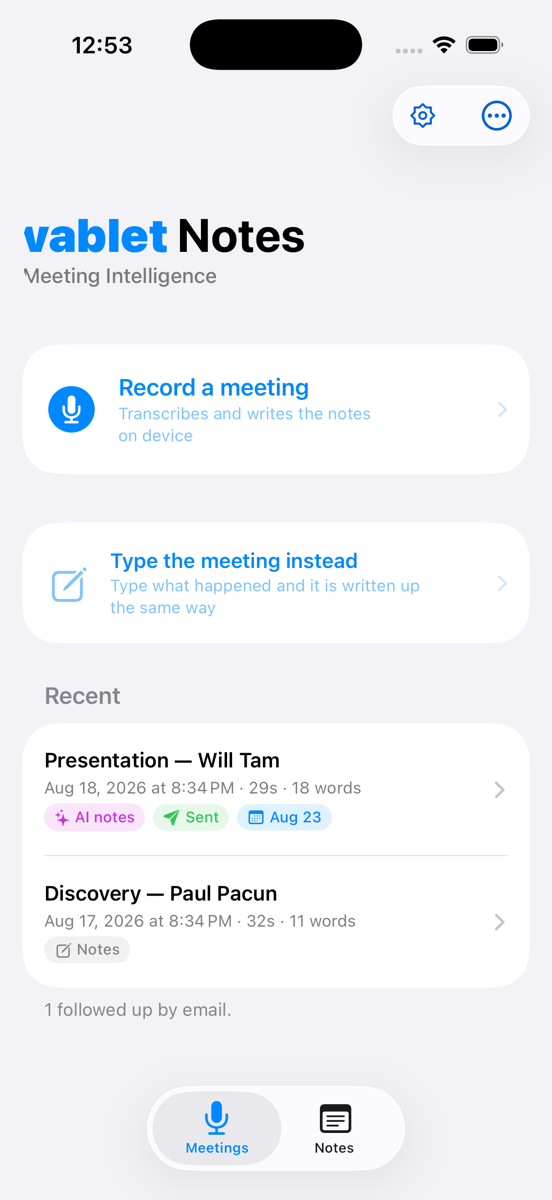
The vabletNotes home screen on an iPhone, showing Record a meeting and a list of recent meetings.

Try it in airplane mode. Recording, transcription and the notes all still work. That is the whole product, demonstrated in ten seconds.

Capture the meeting. Close the loop.

Most notetakers hand you a transcript and leave the hard part to you. vabletNotes is built for the half that actually matters — what happens next.

1 — It listens, on the phone

Say “Hey Siri, record a meeting with vabletNotes”, or tap once. It counts itself in silently and transcribes as people speak. No bot joins the call, because there is no call to join — it is a phone on the table.

2 — It finds the commitments

Not a wall of text. vabletNotes separates what was decided from what was promised, notes who owes what, and links each line back to the moment it was said so you can check the wording before you repeat it.

3 — It writes the follow-up

The email is drafted from what was agreed, addressed to the people who were there, with the files you showed attached. It opens ready to send. You press send — the app never does it for you.

Watch it work

Two minutes each. No narration over a slide deck — just the app, on a phone, doing the thing.

Video placeholder
How to record a meeting
From “Hey Siri” to a sent follow-up, in one take.
Video placeholder
Record and automate your notes
Dictate a note, and let Flows file it, calendar it and address it.

What it looks like in the hand

Big type, one decision per screen, and controls you can hit without looking. Built for somebody standing in a car park, not sitting at a desk.

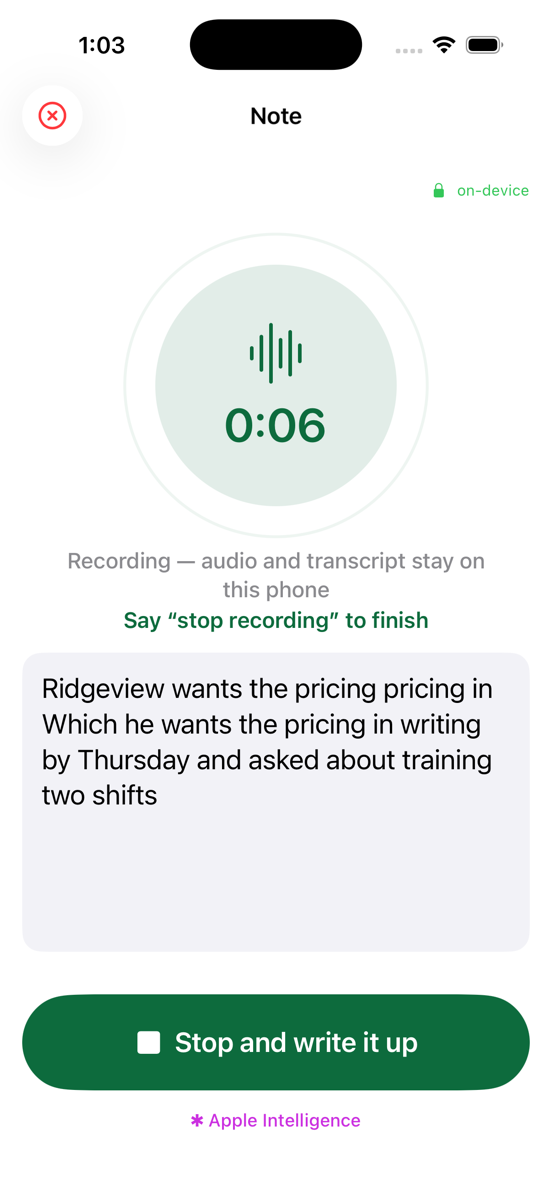
vabletNotes recording a note, showing the live transcript in large type and a green Stop and write it up button.
Recording, with the words appearing as they are said. Say “stop recording” and it stops.
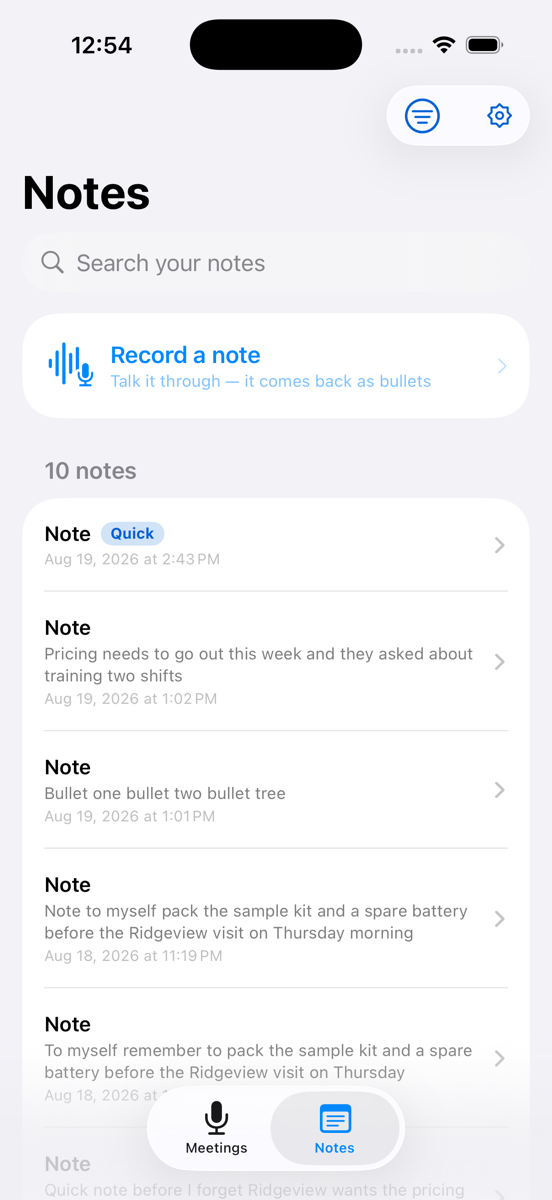
The Notes tab in vabletNotes, listing saved notes with their kind and date.
Every note kept and searchable — quick notes, follow-ups, tasks and ideas.
The vabletNotes home screen with recent meetings and their follow-up status.
Recent meetings, and whether the follow-up actually went.

We can’t read your meetings.
Not by policy — by design.

Other apps promise not to look at your data. That promise is only as good as the company making it, its next funding round, and its next acquirer.

vabletNotes makes a different kind of statement. Your recording is transcribed and written up on your phone. It never reaches us, so there is nothing for us to look at, leak, be subpoenaed for, or train on.

What leaves your phone is what you send: an email you press send on, a calendar entry you asked for, a file you exported. Those go to your provider and your recipients — not to us. We would rather say that plainly than make a claim that falls apart the first time you email somebody.

  • No account, ever. Nothing to sign up for, nothing to be breached.
  • Zero subprocessors. No transcription vendor, no AI provider, no cloud host. Nobody to add to a security questionnaire.
  • Your meetings cannot train a model. We never receive them. That is architecture, not a promise.
  • No bot in the room. Nobody sees a third-party participant, because there isn’t one.
  • It outlives us. If this company disappeared tomorrow, your notes would still open. They are on your phone, not our infrastructure.

Read the full privacy policy →

How it differs from cloud notetakers

The popular AI notetakers do more than we do. They also send your meeting somewhere else to do it. Here is the trade, stated plainly.

 Typical cloud notetakervabletNotes
Where your recording goesUploaded to the vendor and its AI providersTranscribed on your phone
Works with no connectionNoYes — capture, notes and search
Joins your call as a botUsually yesNever
Subprocessors to reviewTypically three to fiveNone
Account requiredYesNo
Recording minutes meteredCommonly, by planNever, on either plan
Writes the follow-up emailSometimes, via access to your mailboxYes — opened in your mail app, sent by you
Survives the vendor shutting downNoYes

“Typical cloud notetaker” describes the common architecture across widely used AI meeting assistants. Individual products vary — check any vendor’s current documentation before relying on a comparison.

Free forever. Pro when your history is worth keeping.

We do not meter minutes. Record as much as you like on the free plan — the paid plan is about the business memory that builds up behind it.

vabletNotes Free

$0forever
  • Record meetings and dictate notes, with no minute limit
  • On-device transcription and summaries
  • Decisions, action items and commitments
  • Contacts on a meeting or note
  • Follow-up email, written and addressed
  • Calendar entries
  • Spanish, where your device supports it

Prices shown are for the United States and are charged by Apple in your own currency. Subscriptions renew automatically and can be cancelled any time in iOS Settings. If you stop paying, nothing you recorded is deleted — only the Pro views close.

The shortest privacy label in the category.

Apple requires every app to declare what it collects. Open a competitor’s App Store listing and scroll the list. Then open ours.

It is the most honest page of marketing we could put in front of you, precisely because we did not write it — Apple’s format did.

App Privacy

As declared to Apple’s App Store
Data used to track youNONE
Data linked to youNONE
Audio recordingsNOT COLLECTED
Transcripts & notesNOT COLLECTED
ContactsNOT COLLECTED
IdentifiersNOT COLLECTED
Usage & diagnosticsNOT COLLECTED

Built by a company that has been doing this since 2010.

Most private notetaking apps are one developer and two App Store ratings. vabletNotes comes from vablet — enterprise software trusted with sensitive field and clinical content by manufacturers, medical device companies and life sciences teams for fifteen years.

2010
Shipping enterprise software since
60+
Countries with active users
0
Copies of your meeting on our servers

Questions worth asking

If nothing is uploaded, how does the AI work?

Recent iPhones run speech recognition and language models on the device itself. vabletNotes uses those on-device frameworks — the same reason your phone can transcribe a voice memo without asking a server. Nothing about your meeting is sent to vablet, because there is no vablet server involved.

Does vabletNotes work offline?

Yes, completely, for the part that matters. Recording, transcription, writing the notes, saving them and searching them all work in airplane mode. Sending an email or syncing a calendar entry needs a connection, because those go to your own mail and calendar providers.

What does it cost?

The app is free forever, with no limit on how much you record. vabletNotes Pro is $7.99 a month or $59.99 a year, and adds the People view, your full document library, message history, advanced search and additional languages. New users get a free trial.

Is anything limited on the free version?

There is no cap on recording minutes and no watermark. Free includes recording, transcription, meeting summaries, decisions and action items, contacts, the follow-up email and the calendar entry. Pro is about the history you build up over time, not about metering what you capture.

Do I still need to tell people I am recording?

Yes. Recording laws vary by country and by US state, and several require the consent of everyone present. Processing on your device does not change your legal obligations to the people in the room.

What happens if I lose my phone?

Your notes are gone unless you have a backup. We cannot recover them, because we never had them — that is the same property that makes the app private. vabletNotes Pro can export a backup file you keep wherever you like, and your notes are also included in your iPhone's own iCloud or computer backup.

Can I use it with Outlook or Gmail instead of Apple Mail?

Yes. Set your preferred app as the default mail app in iOS Settings, then choose “Send from my default mail app instead” on the email screen. The message opens there, addressed and written, and you press send.

Which devices does it run on?

iPhone and iPad running iOS 18 or later. Writing notes automatically requires a device that supports Apple Intelligence; on other devices you get the transcript and write the notes yourself. There is no Mac app.

Does it join my video calls as a bot?

No. There is no meeting bot and no calendar integration that adds a participant. vabletNotes records through your phone's microphone, in the room, like a person taking notes.

Is this the same as the vablet app my company uses?

No. vablet is an enterprise content platform for field and sales teams. vabletNotes is a separate app for individuals, with its own privacy policy and its own data handling. Same company, same standards, different product.
Your next meeting stays on your phone.

Record it, get the commitments out of it, and have the follow-up written before you have left the building.

Download on the App Store

iPhone and iPad · No account required · Free forever